INFO
This article was auto-translated using ChatGPT.
When using YouTube, I subscribe to several channels. Some channels have videos that can be perfectly understood just by listening, without needing to watch. Previously, I had a premium membership for background playback, but I found its usage too low for me; I basically only watch one show a day. So, I didn't renew it after it expired. However, I still wanted to consume those shows but didn't want my phone screen to stay on, wasting unnecessary battery (not eco-friendly 🐶). This made me wonder if I could extract the audio from a video and generate a podcast feed so I could listen to the content in the background.
So, I searched and found a program called Podsync. This program could realize my idea of turning a YouTube channel into a subscribable podcast that updates with the YouTube channel.

After reviewing the Readme, I started the installation and configuration. I initially chose to install it using Docker because this method doesn't require installing or configuring other environments. After pulling the image, I began creating the container, but before that, I needed to prepare by creating a configuration file, a TOML file, with the following content:
[server]
	port = 8080
	data_dir = "~/data/podsync/"
	hostname = "https://podsync.example.com"

[tokens]
	youtube = "AIzaSyBEfG3YkddyiqT-htAa5xOE4VwLMFzPtZE"

[feeds]
	[feeds.wangjian]
	url = "https://www.youtube.com/channel/UC8UCbiPrm2zN9nZHKdTevZA"
	format = "audio"
	filters = {
	not_title="shorts"
	}
	update_period = "2h"

[downloader]
	self_update = true
Under [server], there are port and data_dir. These are the export port and the path to the folder where downloaded video content is stored, respectively. hostname is for setting your own domain name; if you don't set it, you won't be able to access the corresponding audio source correctly, and thus won't be able to use the podcast subscription normally.
[tokens] is the YouTube API token, which can be applied for using the method below:
https://github.com/mxpv/podsync/blob/main/docs/how_to_get_vimeo_token.md
[feeds] is where you list the channels you want to subscribe to. They are named in the format [feed.channel_name], where channel_name must be unique. In the url field of [feed.channel_name], put the channel link. For format, write audio if you want to subscribe to audio, and video for video. You can also use the filters parameter to filter out content based on certain conditions, and update_period to set the update frequency.
[downloader] is for configuring the downloader. Setting self_update to true enables automatic updates for the downloader.
More configuration details can be found at this link:
https://github.com/mxpv/podsync/blob/main/config.toml.example
After configuring these, you can create the container using the following command:
docker run \
  -p 8080:8080 \
  -v $(pwd)/data:/app/data/ \
  -v $(pwd)/config.toml:/app/config.toml \
  mxpv/podsync:latest
After successful creation, I thought it would run normally, but unfortunately, it didn't. An error occurred, displaying failed to execute youtube-dl signal killed. So, I started trying to find a solution for this error. I first checked the issues on the corresponding GitHub repository but didn't find any relevant results. Then I used Google to search, but still couldn't find an effective solution.
So, I had to figure it out myself. I first downloaded the source code to compile and use, abandoning Docker, but the same problem still occurred.
I carefully examined the error, which was related to the youtube-dl dependency. So I used this dependency alone to download videos and found that its download speed was very slow, only tens of KB. Then I checked the issues on its repository to see if anyone had reported slow download issues. To my surprise, there were. I saw a comment suggesting switching to another downloader, yt-dlp. So I tried using the recommended downloader to download videos and found that it could download at full speed. I thought maybe the problem was with the slow speed of the downloader, so I started considering replacing the youtube-dl downloader that Podsync relies on.
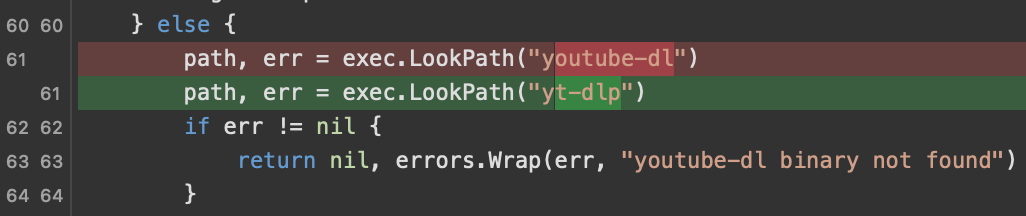
After searching for a while in the Podsync source code, I found the downloader-related code. I replaced the corresponding content in the code with yt-dlp as follows:
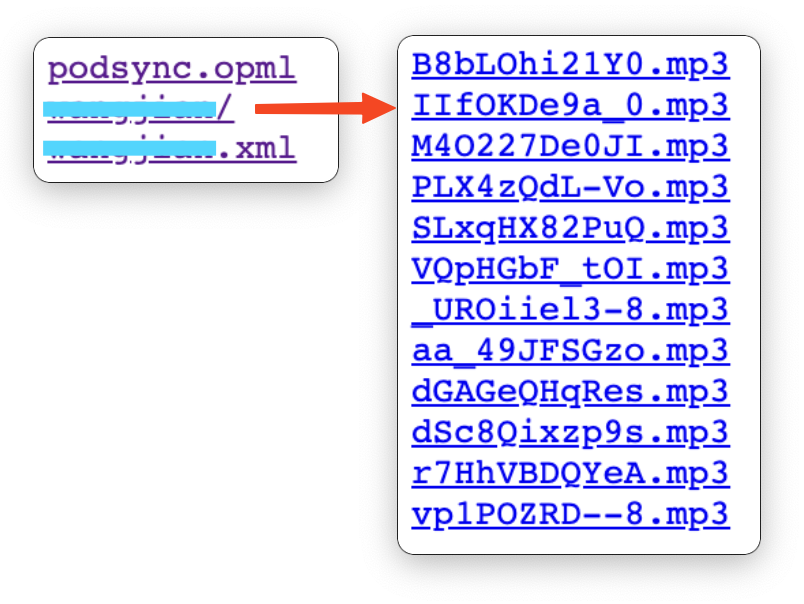
After running it again, it finally worked normally! It successfully generated the following content, including the subscription XML file!