INFO
This article was auto-translated using ChatGPT.
Recently encountered an issue with Vue, the code is as follows:
<!doctype html>
<html lang="en">
  <head>
    <meta charset="UTF-8" />
    <meta http-equiv="X-UA-Compatible" content="IE=edge" />
    <meta name="viewport" content="width=device-width, initial-scale=1.0" />
    <title>Hello vue!</title>
    <script type="application/javascript" src="./js/vue.js"></script>
  </head>
  <body>
    <script>
      Vue.config.productionTip = false;
    </script>
  </body>
</html>
By checking the corresponding documentation for Vue2, it can be understood that the Vue.config.productionTip parameter configuration can prevent Vue from generating a production tip on startup.
Problem Analysis
However, when running the above code in Chrome, the result is not what we expected; Vue still outputs the production tip. So, what is the problem here?
If we run this code in Safari, the result is different. In Safari, running this snippet shows that Vue.config.productionTip = false miraculously works. Why is this?
After reviewing the corresponding source code, the answer seems to emerge. In the source code, the code for outputting the production tip is as follows:
if (inBrowser) {
  setTimeout(() => {
    if (config.devtools) {
      if (devtools) {
        devtools.emit('init', Vue)
      } else if (__DEV__ && process.env.NODE_ENV !== 'test') {
        // @ts-expect-error
        console[console.info ? 'info' : 'log'](
          'Download the Vue Devtools extension for a better development experience:\n' +
            'https://github.com/vuejs/vue-devtools'
        )
      }
    }
    if (
      __DEV__ &&
      process.env.NODE_ENV !== 'test' &&
      config.productionTip !== false &&
      typeof console !== 'undefined'
    ) {
      // @ts-expect-error
      console[console.info ? 'info' : 'log'](
        `You are running Vue in development mode.\n` +
          `Make sure to turn on production mode when deploying for production.\n` +
          `See more tips at https://vuejs.org/guide/deployment.html`
      )
    }
  }, 0)
}
It can be seen that Vue places the output of the production tip into a setTimeout function with a zero delay. What is the purpose of this?
The purpose of
setTimeout(f,0)is to putfat the end of the run queue, makingfexecute asynchronously.
Therefore, the production tip code mentioned above is also executed last. But this only explains why Vue.config.productionTip takes effect in Safari. Why doesn't it take effect in Chrome?
Finding the Cause
To figure out why it doesn't take effect in Chrome, we can examine their call stack using developer tools.
INFO
To get a clean environment and shield against plugins and other interference, we can use incognito mode to open the performance (Chrome) / timeline (Safari) panel. This will provide a clean environment.
First, let's look at Safari's situation:
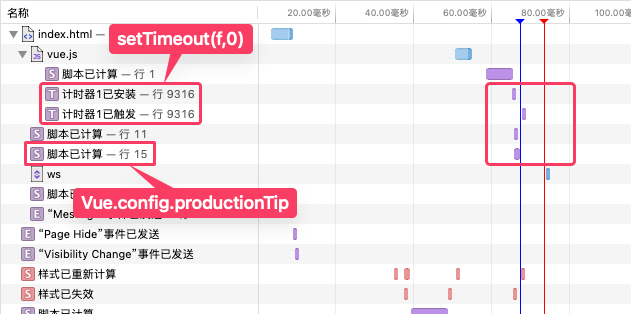
In Safari, you can see that the Vue.config.productionTip code is executed before the setTimeout callback. This is why configuring Vue.config.productionTip = false works in Safari, because Vue has not yet run the code to output the production tip before this snippet is executed.
Then, let's look at Chrome's situation:
In Chrome, two situations can occur: the first is when the page is loaded for the first time, and the second is when the page is refreshed (not a hard refresh). In these two situations, only the first one will not take effect.
- When the page is loaded for the first time

When loading for the first time, Chrome needs to request the Vue.js code. After Vue.js is requested, Chrome directly runs the Vue.js code. Then, after this task ends, the setTimeout set in Vue.js is executed, followed by parsing the HTML code and running the Vue.config.productionTip = false snippet. This is why configuring Vue.config.productionTip = false does not take effect in Chrome.
- When refreshing the page

When refreshing the page, Chrome already has the Vue.js code from before, so it doesn't request it again this time but reads it directly from the cache. Therefore, this time, the execution of Vue.js code is synchronous with the parsing of HTML code. When parsing HTML code, the Vue.config.productionTip = false snippet is also executed, so it takes effect this time. Finally, after this task settles, the setTimeout callback is executed. Therefore, when refreshing the page, configuring Vue.config.productionTip = false in Chrome takes effect.
Thus, the reason for this problem is that Chrome and Safari have different timings for HTML parsing and JavaScript code execution, which leads to this issue.
Solution
If you want Vue.config.productionTip = false to run correctly in Chrome, you can solve this problem by adding the onload attribute to the <script> tag.
The onload attribute will execute after the script has finished loading. Therefore, we can set Vue.config.productionTip = false within the onload attribute. This ensures that Vue.config.productionTip = false is set before the setTimeout defined in the Vue.js code is executed, thus ensuring it works correctly in Chrome.
The Chrome performance panel situation after using the onload attribute in the code is shown below:

<!DOCTYPE html>
<html lang="en">
  <head>
    <meta charset="UTF-8" />
    <meta http-equiv="X-UA-Compatible" content="IE=edge" />
    <meta name="viewport" content="width=device-width, initial-scale=1.0" />
    <title>Hello vue!</title>
    <script type="application/javascript" src="./js/vue.js" onload="Vue.config.productionTip = false"></script>
  </head>
  <body>
  </body>
</html>